What is Hindi Changathi Converter?
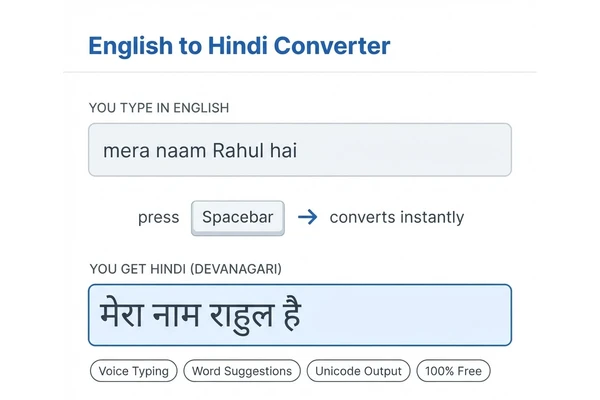
Hindi Changathi Converter is a free online English to Hindi typing tool that lets you write Hindi using a normal English (QWERTY) keyboard. You type each word the way it sounds — in Roman English letters — and the moment you press the Spacebar, the tool converts it into Hindi (Devanagari) script in real time. There is nothing to download, nothing to install, and no Hindi keyboard or Hindi font is required on your computer or mobile phone.
Millions of people search every day for ways to convert English to Hindi, but most of them do not want a dictionary translation — they simply want to type Hindi words with an English keyboard. That is exactly what this Hindi conversion tool does. Whether you write "eng to hin" style Hinglish messages, official letters, blog posts, or social media captions, the Changathi Hindi typing method makes online English to Hindi typing effortless and fast.
Transliteration vs Translation: What This Tool Does
It is important to understand the difference between English to Hindi transliteration and English to Hindi translation:
- Transliteration converts the sound of your typing into Hindi script. Typing mera naam gives you मेरा नाम. The language stays Hindi — only the script changes from Roman to Devanagari. This is what Hindi Changathi Converter does.
- Translation converts the meaning from one language to another. If you translate "my name" from English to Hindi, you get मेरा नाम because the meaning is converted, not the sound.
If you already know Hindi and just need to type it, transliteration is far faster and more accurate than any English to Hindi translation service, because you stay in full control of every word. For people searching for an English to Hindi translator online to type Hindi text, a transliteration tool like this one is almost always what they actually need.
Why Use Our Online English to Hindi Typing Tool?
- Instant, lag-free conversion: Hindi suggestions are fetched while you type, so pressing Spacebar converts your word with zero delay — even when typing fast.
- Smart suggestions: every converted word carries multiple alternative Hindi spellings. One Backspace opens the list; a second Backspace restores your original English word.
- Hindi voice typing: speak in Hindi and watch your words appear as text — great for long paragraphs and hands-free typing.
- Unicode Hindi output: the text is standard Unicode (Mangal-compatible), so it works everywhere — WhatsApp, Facebook, Instagram, X, MS Word, Excel, Gmail, and government portals.
- 100% free and private: no signup, no limits, and your full text never leaves your browser.
- Works on mobile: the converter supports Android and iPhone keyboards, so you can type Hindi on any device.
Convert Any English Sentence or Paragraph to Hindi
The tool handles full sentences and long paragraphs — not just single words. This makes it ideal for students preparing notes in Hindi, writers composing articles, and professionals drafting official correspondence. The output is Unicode-compatible Hindi (Devanagari script) that works in WhatsApp, MS Word, Facebook, and any app. Simply type your English text word by word, press Spacebar after each word, and watch your entire paragraph convert to Hindi in real time. For hands-free typing, try our phonetic Hindi typing tool.
Online Transliteration English to Hindi — What Makes It Different
Many users search for "transliteration" without understanding what it means. Transliteration converts the sound of English words into Hindi script (Devanagari), while translation changes the meaning. For example, typing "namaste" gives you "नमस्ते" — the sound is preserved, not the meaning. This tool does phonetic transliteration, making it perfect for anyone who already knows Hindi and just needs to type it using an English keyboard.
Who is This Hindi Conversion Tool For?
Students preparing notes in Hindi, professionals writing official correspondence, bloggers and journalists publishing Hindi content, shop owners creating WhatsApp broadcasts, and anyone chatting with family — all of them need a fast way to convert English typing into Hindi script. Typists preparing for government exams also use our Krutidev to Unicode converter to switch between legacy fonts and modern Unicode Hindi. If you have Hindi text and need it back in English letters, try the Hindi to English converter.
More Free Hindi Typing Tools
- Hindi to English converter — convert Devanagari Hindi text back into readable Roman English letters.
- Hindi voice typing tool — speech to text in Hindi; speak and get Hindi text instantly.
- Krutidev to Unicode converter — convert Kruti Dev font text to Unicode (Mangal) and back.
- Unicode Hindi Typing — learn about Unicode Hindi and type directly in Unicode Devanagari.
Frequently Asked Questions
1. How do I convert English to Hindi with this tool?
Type any word phonetically in English letters (for example, namaste) and press the Spacebar or a comma. The word instantly converts into Hindi script. Keep typing word by word and your whole text appears in Hindi.
2. Is this English to Hindi typing tool free?
Yes, completely free — no registration, no installation, and no limits on how much English text you convert to Hindi online.
3. What if the Hindi word is wrong?
Press Backspace immediately after the converted word. A dropdown appears with alternative Hindi spellings and the original English word. Pick the right one with a click or arrow keys, or press Backspace again to revert the word to English.
4. Does the tool convert on comma too?
Yes. Along with Spacebar and Enter, pressing a comma, full stop, or question mark also converts the word you just typed — so your punctuation flow never breaks.
5. Can I use the Hindi text in MS Word, WhatsApp, and Facebook?
Yes. The output is standard Unicode Hindi, so it pastes perfectly into any app, website, or document, and displays correctly on every modern device.
6. Is my text stored anywhere?
No. Your full text stays in your browser. Only individual words are sent to the transliteration service to fetch suggestions — see our privacy policy for details.
7. Can I use this as a sentence converter from English to Hindi?
Yes. This tool works for single words, full sentences, and entire paragraphs. Type your English text, press Spacebar after each word, and the tool converts it to Hindi (Devanagari) in real time. It is the fastest free sentence converter English to Hindi available online.
8. What is the difference between English to Hindi transliteration and translation?
Transliteration converts the phonetic sound of English words into Hindi script. For example, typing namaste gives नमस्ते. Translation changes the meaning from one language to another. This tool does transliteration — it is an online transliteration English to Hindi tool, not a meaning-based translator.
9. Does this tool work as a Hindi typing tool for phonetic input?
Yes. This is a phonetic Hindi typing tool — you type using your regular English (QWERTY) keyboard and the tool outputs Hindi Devanagari script. It supports phonetic Hindi typing, voice input, and smart word suggestions. No special keyboard or software download needed.